 |
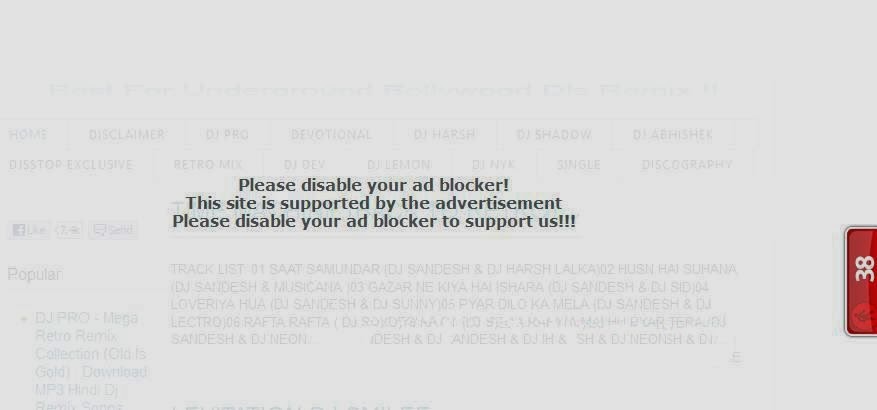
| Show AdBlocker Disable Warning on Your Blogger Blogspot if Adblock Extension is Installed |
1. Login to Blogger with your ID.
2. Click Template.
3. Click tab Edit HTML > Proceed >
4. Find & Past Below Code Before
]]></b:skin>#g207{position:fixed!important;position:absolute;top:0;top:expression((t=document.documentElement.scrollTop?document.documentElement.scrollTop:document.body.scrollTop)+"px");left:0;width:100%;height:100%;background-color:#fff;opacity:0.9;filter:alpha(opacity=90);display:block}#g207 p{opacity:1;filter:none;font:bold 16px Verdana,Arial,sans-serif;text-align:center;margin:20% 0}#g207 p a,#g207 p i{font-size:12px}#g207 ~ *{display:none} 5. Save Template.
6. Go to Blogger >> Layout >> Click on Add a Gadget >> Select HTML/JavaScript >> Then Copy & Past Below HTML Code.
<script>(function(w,u){var d=w.document,z=typeof u;function g207(){function c(c,i){var e=d.createElement('i'),b=d.body,s=b.style,l=b.childNodes.length;if(typeof i!=z){e.setAttribute('id',i);s.margin=s.padding=0;s.height='100%';l=Math.floor(Math.random()*l)+1}e.innerHTML=c;b.insertBefore(e,b.childNodes[l-1])}function g(i,t){return !t?d.getElementById(i):d.getElementsByTagName(t)};function f(v){if(!g('g207')){c('<p>Please disable your ad blocker!<br/>This site is supported by the advertisement <br/> Please disable your ad blocker to support us!!! </p>','g207')}};(function(){var a=['Adrectangle','PageLeaderAd','ad-column','advertising2','divAdBox','mochila-column-right-ad-300x250-1','searchAdSenseBox','ad','ads','adsense'],l=a.length,i,s='',e;for(i=0;i<l;i++){if(!g(a[i])){s+='<a id="'+a[i]+'"></a>'}}c(s);l=a.length;for(i=0;i<l;i++){e=g(a[i]);if(e.offsetParent==null||(w.getComputedStyle?d.defaultView.getComputedStyle(e,null).getPropertyValue('display'):e.currentStyle.display)=='none'){return f('#'+a[i])}}}());(function(){var t=g(0,'img'),a=['/adaffiliate_','/adops/ad','/adsales/ad','/adsby.','/adtest.','/ajax/ads/ad','/controller/ads/ad','/pageads/ad','/weather/ads/ad','-728x90-'],i;if(typeof t[0]!=z&&typeof t[0].src!=z){i=new Image();i.onload=function(){this.onload=z;this.onerror=function(){f(this.src)};this.src=t[0].src+'#'+a.join('')};i.src=t[0].src}}());(function(){var o={'http://pagead2.googlesyndication.com/pagead/show_ads.js':'google_ad_client','http://js.adscale.de/getads.js':'adscale_slot_id','http://get.mirando.de/mirando.js':'adPlaceId'},S=g(0,'script'),l=S.length-1,n,r,i,v,s;d.write=null;for(i=l;i>=0;--i){s=S[i];if(typeof o[s.src]!=z){n=d.createElement('script');n.type='text/javascript';n.src=s.src;v=o[s.src];w[v]=u;r=S[0];n.onload=n.onreadystatechange=function(){if(typeof w[v]==z&&(!this.readyState||this.readyState==="loaded"||this.readyState==="complete")){n.onload=n.onreadystatechange=null;r.parentNode.removeChild(n);w[v]=null}};r.parentNode.insertBefore(n,r);setTimeout(function(){if(w[v]!==null){f(n.src)}},2000);break}}}())}if(d.addEventListener){w.addEventListener('load',g207,false)}else{w.attachEvent('onload',g207)}})(window);</script> 7. Now Click On Save & Say thanks to Antiblock.org
If not work 1st trick on your BLOG. please try another:
1. Login to Blogger with your ID.
2. Click Template.
3. Click tab Edit HTML > Proceed >
]]></b:skin>#mbl_noadblocker {
display:none;
} 6. Now Find & Past Below Code Before
</head> <script type="text/javascript">
if (document.getElementById("mbl_noadblocker") != undefined)
{
}
else
{
alert("We've detected that you're using AdBlock Plus or some other adblocking software. In order to keep this website free, this site is sponsored in part by advertisements.\r\nPlease consider disabling your ad blocker on this website\r\nif you enjoyed the content, and would like to support future \r\ninformative posts.Thank you!\r\n\r\nClick OK to continue\r\n\r\nPowered by VisualDreamersOfficial);
setTimeout("nag()",12000);
}
</script>
7. Now Find & Past Below Code After
<body><script type="text/javascript" src="http://ftp.bauer-power.net/misc/tc/advertisement.js"></script> 8. Now Save Template | Via - mybloggerlab.com


